How to Charge the Radiacode Battery
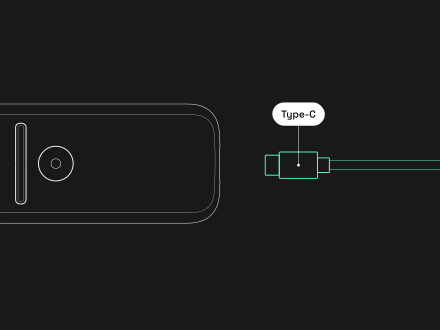
ATTENTION! Use only a direct USB connection to a dedicated power adapter or a standalone USB port. Avoid USB hubs, shared charging stations, 3-in-1 or other multi-device charging cables, and charging other devices from the same power source at the same time.
You can charge your Radiacode device safely and efficiently using any standard charger that supports USB or USB Type-C connections.
Charging Instructions:
1. Select a Compatible Charger:
- Use any standard USB or USB Type-C charger with single usb port.
- Chargers supporting Power Delivery (PD) or other fast-charging technologies are compatible and will not damage the device.
- High-power chargers are safe to use; the device regulates the power it draws to prevent overcharging.
2. Connect the Charging Cable:
- Plug one end of the USB or USB Type-C cable into the charging port of the Radiacode device.
- Connect the other end of the cable to the charger or a USB port on your computer.
- Please ensure you are not charging another device from your laptop at this time.
3. Begin Charging:
- Once connected, the blue LED light on the device will illuminate, indicating that charging has started.
- If the blue LED does not light up, ensure that the connections are secure and the power source is functioning.
4. Monitor the Charging Process:
- The device does not display the battery level during charging.
- Allow the device to charge uninterrupted until it reaches full capacity.
- Charging times may vary depending on the power output of the charger used.
- Avoid interrupting the charging process to prevent inaccurate battery level readings.
5. Confirm Full Charge:
- Charging Complete Indicator: The most reliable way to confirm that the device is fully charged (100%) is when the blue LED light turns off.
- Once the blue LED extinguishes, the device has reached a full charge.
- Some models may indicate a full charge by turning off the charging light or displaying a full battery icon.
6. Disconnect the Charger:
- Unplug the charging cable from both the device and the power source.
- Your Radiacode device is now ready for use.
Important Notes:
- Power Source Requirements:
- Use only high-quality, certified charging cables and power adapters.
- Connect the device directly to a dedicated USB power adapter or standalone USB port.
- Do not use 3-in-1, multi-device, split, or extension charging cables.
- Avoid USB hubs, docking stations, and shared charging infrastructure.
- Do not charge other devices from the same power source while the device is connected.
- Unstable or overloaded power sources may affect charging performance and device.
- Safe to Use Fast Chargers:
- Fast charging systems like Power Delivery (PD) will not harm the device; the Radiacode device is designed to handle varying power inputs safely.
- Battery Maintenance:
- Regular charging helps maintain battery health.
- Avoid letting the battery discharge completely before recharging.
- Unique Charging Behavior:
- The Radiacode device has a non-typical charging scheme.
- It does not display the battery level during the charging process.
- Interrupting the charging may cause inaccurate battery level readings.
- No Risk from High-Power Chargers:
- Using chargers with higher power ratings is safe; the device will only draw the power it requires.
- Avoid Overheating:
- Charge the device in a cool, ventilated area to prevent overheating.
- Charging Indicator:
- The extinguishing of the blue LED is the definitive indicator that the device is fully charged.
Troubleshooting:
- Device Not Charging:
- Ensure the charging cable and charger are functioning by testing them with another device.
- Check the charging port for debris or damage.
- Try using a different power source or USB port.
- Charging Indicator (blue LED) Does Not Illuminate:
- Verify that the device is properly connected.
- Restart the device and attempt to charge again.
- If Issues Persist:
- Contact Radiacode technical support team for assistance.
Contact Information:
- Email: support@radiacode.com
- Telegram: Radiacode Support Channel
By following these instructions, you can safely and effectively charge your Radiacode device, ensuring it is always ready for use when you need it.